


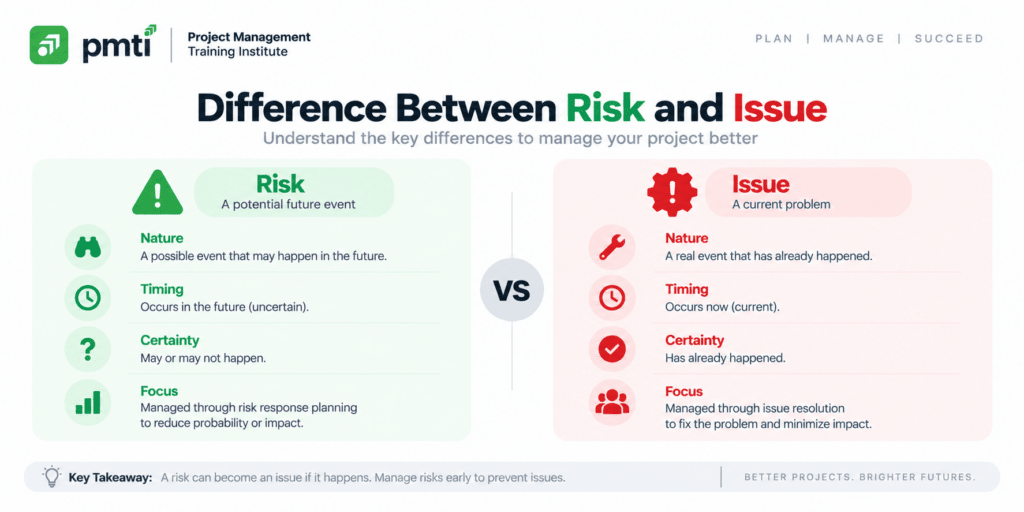
This guide compares the two, shows how a risk becomes an issue, and explains how to manage each on a project and on the PMP exam.
What Is the Difference Between a Risk and an Issue?
A risk is an uncertain future event that affects an objective if it occurs. An issue is a current condition that affects an objective now. Risks carry a probability and live in the risk register. Issues are certain and live in the issue log.
| Attribute | Risk | Issue |
| Definition | Uncertain event or condition that affects an objective if it occurs | Current event or condition that affects an objective now |
| Time orientation | Future | Present |
| Certainty | Probability between 0% and 100% | Certain, because it has occurred |
| Effect | Positive (opportunity) or negative (threat) | Usually negative |
| Recorded in | Risk register | Issue log |
| Rated by | Probability and impact | Impact and urgency |
| Response | Avoid, transfer, mitigate, accept, exploit, share, or enhance | Resolve, apply a workaround, escalate, or raise a change request |
| Funded from | Contingency reserve, when registered | Contingency reserve if registered as a risk, management reserve if not |
| Example | The key supplier has a 40% chance of delivering late | The key supplier delivered 2 weeks late |
What Is a Risk in Project Management?

A risk is an uncertain event or condition that affects one or more project objectives, positively or negatively, if it occurs. A negative risk is a threat. A positive risk is an opportunity. Every risk has a probability, an impact, and an owner.
Risk management works ahead of events. The team identifies risks, scores them, plans responses, and records everything in the risk register. Each risk carries a trigger, which is the warning sign that the event is close. Example: a supplier that misses a milestone by 5 days signals a delivery risk.
What Is an Issue in Project Management?
An issue is a current condition or event that affects project objectives and needs action now. Examples include a supplier that delivered late, a key team member who resigned, and a server outage that halts testing. Issues go into the issue log.
The PMBOK Guide Sixth Edition creates the issue log as an output of Direct and Manage Project Work. Monitoring and controlling processes update it. The Sixth Edition has no separate issue management process, so teams build their own from the change control and communication processes.
An issue needs an owner, a due date, and a resolution path. Some issues exceed the project manager’s authority. Escalate those to the sponsor.
How Does a Risk Become an Issue?
A risk becomes an issue the moment the event occurs. Open an issue log entry linked to the risk ID, run the contingency plan, and close the risk entry instead of deleting it. An issue with no linked risk exposes an identification gap.
Follow 5 steps when a risk occurs:
- Confirm the trigger, and record the date the event occurred.
- Open an issue log entry, and link it to the risk ID.
- Run the contingency plan recorded in the risk register.
- Switch to the fallback plan if the contingency plan fails.
- Close the risk entry, keep it in the register, and record the outcome in lessons learned.
Example timeline:
| Date | Event | Record |
| Week 2 | Team identifies supplier delay as a risk at 40% probability | Risk R7 opened, response: mitigate |
| Week 9 | Supplier misses a milestone by 5 days | Trigger fires, contingency plan starts |
| Week 9 | Delivery is late and affects the schedule | Issue I-12 opened, linked to R7 |
| Week 11 | Second supplier delivers | Issue I-12 closed, R7 closed |
| Week 12 | Retrospective | Lesson recorded: qualify backup suppliers earlier |
An issue that was never a risk means the event arrived without a written warning. Record it in lessons learned and add its source to the risk breakdown structure, so the next project looks for it.
What Goes in a Risk Register and an Issue Log?
The risk register records probability, impact, response strategy, trigger, and owner for each uncertain event. The issue log records impact, priority, owner, due date, and resolution for each event that has occurred. Many teams combine both in a RAID log.
PMTI’s guide What is a Risk Register in Project Management? covers the register layout in detail. Compare the two logs field by field:
| Risk register field | Issue log field |
| Risk ID | Issue ID |
| Description | Description |
| Category | Category |
| Probability | Date raised |
| Impact | Impact |
| Score (probability × impact) | Priority (impact and urgency) |
| Response strategy | Resolution path |
| Trigger | Raised by |
| Contingency and fallback plans | Linked risk ID and change request ID |
| Owner | Owner |
| Status | Due date and status |
A RAID log holds risks, assumptions, issues, and dependencies in one document, with a type field on every line. Keep the probability field on risk lines only. A probability on an issue is meaningless, because the event has occurred.
What Is the Difference Between an Issue, an Incident, a Problem, and a Change Request?
An issue is a current condition affecting project objectives. An incident is an unplanned interruption to an IT service. A problem is the cause of one or more incidents. A change request is a formal proposal to modify a baseline or project document.
Four terms overlap in daily use. ITIL 4, the IT service management framework, defines incident and problem. The PMBOK Guide defines issue and change request.
| Term | Definition | Framework | Typical handling |
| Issue | Current condition that affects a project objective | PMBOK Guide | Issue log, owner, resolution date |
| Incident | Unplanned interruption to a service or drop in service quality | ITIL 4 | Restore service fast, often with a workaround |
| Problem | Cause or potential cause of one or more incidents | ITIL 4 | Root cause analysis and a permanent fix |
| Change request | Formal proposal to modify a baseline, plan, or document | PMBOK Guide | Change control board decision |
| Impediment | Blocker that stops the team’s progress | Agile | Scrum Master removes or escalates it |
One event can touch all four. A server outage is an incident. Its unknown cause is a problem. The outage delays testing, which is a project issue. The fix that changes the scope or schedule needs a change request. PMTI’s guide Understanding the Change Management Process: A Comprehensive Guide covers the change request path.
How Do You Manage a Project Issue Step by Step?
Manage an issue in 7 steps: log it, assess impact and urgency, assign an owner, choose a response, execute it, communicate the status, and close it with a lesson learned. Escalate any issue that exceeds the project manager’s authority.
- Log the issue the day it surfaces, with a description, date, and source.
- Assess the impact on scope, schedule, cost, and quality, and rate the urgency.
- Assign a named owner and a due date.
- Choose a response: resolve within the team, apply a workaround, escalate, or raise a change request.
- Execute the response and track it at every status meeting.
- Communicate progress to the sponsor and affected stakeholders.
- Close the issue, record the resolution, and add the lesson to the lessons learned register.
A workaround reduces the impact of an issue while the team fixes its root cause. Teams sometimes call this issue mitigation. It differs from risk mitigation, which lowers the probability or impact of an event that has not yet occurred.
Set escalation thresholds in the communications plan. Example: escalate any issue that threatens the schedule baseline by more than 5 working days.
What Mistakes Blur the Line Between Risks and Issues?
5 mistakes blur the line: logging a current problem as a risk, deleting a risk when it occurs, leaving issues without owners, sharing one probability field, and never linking issues to risks. Each mistake distorts reserves, reports, or lessons learned.
| Mistake | Symptom | Fix |
| Logging a current problem as a risk with 100% probability | The risk register fills with events that already happened, and risk scores inflate | Move it to the issue log |
| Deleting the risk entry when the event occurs | The team loses the record of what it foresaw | Close the entry and link it to the issue |
| Leaving issues without owners | Issues age in the log with no action | Assign a named owner and a due date on entry |
| Sharing one probability column across both logs | Issues show meaningless probability values | Keep probability on risk lines only |
| Never linking issues to risks | Lessons learned miss which risks materialized | Add a linked risk ID field to the issue log |
The difference matters for money as well. A registered risk that occurs draws on the contingency reserve. An event nobody registered draws on the management reserve, which needs approval. Good risk identification keeps the second case rare.
How Often Do You Review Risks and Issues?
Review issues weekly at minimum, and daily for critical ones. Review risks on a schedule that matches project length: monthly for a project of 3 to 6 months, and less often than weekly for a multi-year project. Review both at every phase gate.
PMI-published practitioner guidance sets the pattern. Issues sit in the daily and weekly rhythm because each open issue costs the project time now. Risks sit in a periodic rhythm, because a weekly review of a 2-year risk register adds effort without adding insight.
| Item | Review cadence | Forum |
| Critical issue | Daily | Team stand-up or issue call |
| Open issues | Weekly | Status meeting |
| Risks on a 3 to 6 month project | Monthly | Risk review |
| Risks on a multi-year project | Quarterly or at each phase gate | Steering committee |
| Triggers for high-priority risks | Every status meeting | Status meeting |
How Do Risks and Issues Work in Agile and Hybrid Projects?
Agile and hybrid teams treat an impediment as an issue and a backlog risk as a risk. The team surfaces impediments at the daily stand-up, the Scrum Master removes or escalates them, and the team reviews risks at planning and retrospectives.
- Raise impediments at the daily stand-up, and record any that last longer than a day.
- Escalate impediments outside the team’s authority to the Scrum Master or product owner.
- Add risks to the product backlog, and rank them beside features.
- Review the top risks at sprint planning and at each retrospective.
- Keep a RAID log for hybrid projects that mix predictive phases and agile iterations.
Approximately 60% of the July 2026 PMP exam targets agile or hybrid approaches, so exam scenarios use both vocabularies.
How Are Risks and Issues Tested on the PMP Exam?
PMP scenario questions test tense and sequence. A future, uncertain event is a risk, so the answer involves the risk register or a response plan. A current, certain event is an issue, so the answer involves the log, an owner, and a resolution.
| Scenario cue | Category | Likely first action |
| “The supplier is likely to deliver late” | Risk | Assess probability and impact, add to the risk register |
| “The supplier delivered late” | Issue | Log it, assess the impact, and act |
| A registered risk occurs | Issue | Check the risk register, and run the contingency plan |
| An unregistered event occurs | Issue | Log it, apply a workaround, and update the risk register |
| The fix changes the baseline | Change request | Submit it to change control |
| The event exceeds the project manager’s authority | Issue | Escalate to the sponsor |
The exam rewards the project manager who consults the documented plan first. When a risk occurs, the risk register already holds the response. Read the plan before improvising.
PMTI’s Project Risk Management Course (24 PDUs) covers project risk management in depth for middle and upper management. Max Wideman, a PMI Fellow who led the first PMBOK Guide effort, designed the course and delivers it online.

