


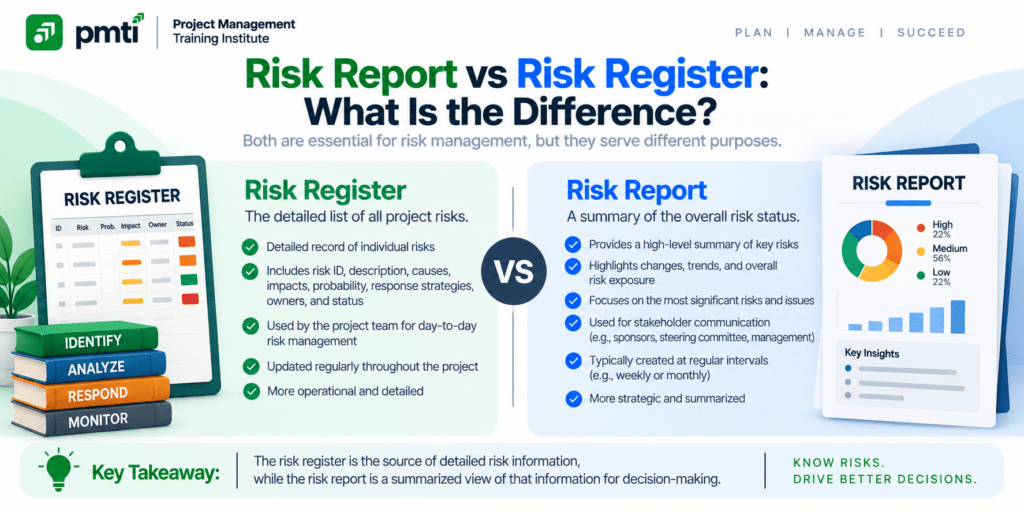
This guide compares the two project documents, shows how each is built and updated, and explains how to use both on a project and on the PMP exam.
What Is the Difference Between a Risk Report and a Risk Register?
A risk register is a continuously updated record of individual project risks. A risk report is a periodic summary of overall project risk and the most important individual risks. The register serves the team. The report serves sponsors and senior stakeholders.
| Attribute | Risk register | Risk report |
| Scope | Every identified individual risk | Overall project risk plus a summary of individual risks |
| Question answered | What is each risk, and who is acting on it? | How risky is the project, and what do you need from us? |
| Level of detail | High | Low |
| Main audience | Project team and risk owners | Sponsor, steering committee, PMO |
| Update rhythm | Whenever a risk changes | At each reporting interval and phase gate |
| Format | Spreadsheet, database, or tool | One to two pages, or a dashboard |
| Time orientation | Living record | Snapshot of a period |
| Decision use | Manage each risk | Fund, escalate, or redirect the project |
| Source | Built from risk identification and analysis | Built from the register and the risk analyses |
Risk log, risk registry, and risk repository mean the same as risk register. A risk control report or risk status report is a risk report under another name.
What Is a Risk Register?

A risk register is a project document that records each identified individual project risk with its description, owner, ratings, response, and status. The team creates it during risk identification and updates it in every later risk process.
PMTI’s guide What is a Risk Register in Project Management? covers the register layout and how to build one. In short, the PMBOK Guide Sixth Edition adds fields as the project moves through the risk processes:
| Stage | Fields added to the register |
| Identify Risks | Unique ID, description, potential owner, potential responses |
| Perform Qualitative Risk Analysis | Probability, impact, priority, category, urgency |
| Perform Quantitative Risk Analysis | Probabilistic estimates of cost and schedule effect |
| Plan Risk Responses | Agreed strategy, actions, triggers, contingency and fallback plans, residual and secondary risks |
| Implement and Monitor | Status, updated ratings, closed and occurred risks |
What Is a Risk Report?
A risk report is a project document that presents the sources of overall project risk, the current level of overall project risk, and summary information on individual project risks. It communicates risk status to stakeholders at a point in time.
PMI separates 2 views of risk. Individual project risks are specific uncertain events. Overall project risk is the effect of all uncertainty on the project as a whole, and it exceeds the sum of the individual risks. The project manager works with the first. The sponsor asks about the second: how risky is this project?
The PMBOK Guide Sixth Edition places 3 kinds of content in the report:
- Sources of overall project risk, ranked by their contribution to exposure.
- Overall project risk status, such as the probability of meeting cost and schedule targets.
- Summary information on individual risks: counts of threats and opportunities, distribution across risk categories, metrics, and trends.
Many teams add response progress, audit findings, reserve usage, and a list of decisions requested.
How Are the Register and the Report Built Across the PMBOK Risk Processes?
The Identify Risks process creates both the risk register and the risk report. Every later risk process updates both: qualitative analysis, quantitative analysis, planning responses, implementing responses, and monitoring. The register grows in detail, and the report grows in insight.
| Process | Register update | Report update |
| Identify Risks | Created: ID, description, potential owner and response | Created: sources of overall risk, first summary of individual risks |
| Perform Qualitative Risk Analysis | Ratings, priority, categories | Distribution of risks by category and priority |
| Perform Quantitative Risk Analysis | Numeric effect of risks | Overall risk exposure, probability of reaching targets |
| Plan Risk Responses | Strategies, owners, triggers, plans | Agreed responses and owners for high-priority risks |
| Implement Risk Responses | Action status, new risks | Progress of responses |
| Monitor Risks | Ratings, status, closures | Trends, audit results, reserve status |
The register feeds the report. A report built from stale register data misleads the reader.
Who Reads the Register and Who Reads the Report?
The project team, risk owners, and project manager read the register daily. Sponsors, steering committees, and the PMO read the report. The project manager reads both. Each reader needs a different level of detail and a different decision.
| Reader | Reads | Needs |
| Risk owner | Register | Own risks, triggers, actions, due dates |
| Project team | Register | Current priorities and response plans |
| Project manager | Both | Detail to manage, summary to communicate |
| Sponsor | Report | Overall exposure, decisions required |
| Steering committee | Report | Trends, escalations, reserve status |
| PMO | Report | Comparable risk status across projects |
Sending the raw register to an executive fails the reader. A 200-line log buries the 5 risks that matter.
What Does a One-Page Risk Report Look Like?
A one-page risk report opens with overall status, then lists the top 5 risks, the period trend, the category distribution, the reserve balance, and the decisions requested. It fits one page so that a senior reader finishes it in minutes.
Example, for one reporting period:
| Section | Content |
| Overall status | Amber: exposure rose after a supplier delay |
| Open risks | 21 (14 threats, 7 opportunities); last period 22 |
| Period movement | 3 new, 4 closed (2 occurred and moved to the issue log) |
| Risks above threshold | 2 |
| Category distribution | Technical 8, commercial 6, management 4, external 3 |
| Contingency reserve | $90,000 approved, $27,000 used, $63,000 remaining |
| Decisions requested | Approve $12,000 to qualify a second supplier |
| Rank | Risk | Score | Owner | Response | Status |
| 1 | Single-source supplier misses delivery | 16 | Procurement lead | Qualify second supplier | Action open |
| 2 | Payment module fails load testing | 15 | Tech lead | Add performance testing | On track |
| 3 | Regulation changes mid-project | 12 | Compliance lead | Monitor, active acceptance | Watching |
| 4 | Key engineer resigns | 9 | Delivery manager | Cross-train backup | Complete |
| 5 | Vendor price rise | 9 | Commercial lead | Fixed-price clause | Negotiating |
Every figure above is an example. Replace them with the project’s own data.
How Do You Turn Register Data Into a Risk Report?

Build the report from the register in 6 steps: filter the top risks, count by category and status, compare with the last period, add the overall risk view, list the decisions needed, and tailor the length to the reader.
- Filter the register for the top 5 to 10 risks by score.
- Count open, new, closed, and occurred risks, and group them by category.
- Compare the counts and total exposure with the last period to show the trend.
- Add the overall view: the probability of meeting cost and schedule targets, or the reserve balance.
- List every decision or support the report needs from its readers.
- Cut the report to the audience: 1 page for executives, more for the PMO.
Track 6 metrics from the register each period:
| Metric | Calculation |
| Open risks | Count of risks not closed |
| Total threat exposure | Sum of probability × impact for open threats |
| Risks above threshold | Count with exposure above the risk threshold |
| Risks that occurred | Count moved to the issue log |
| Overdue response actions | Count past due date |
| Reserve remaining | Approved reserve minus reserve used |
Generate the report from the register, and do not retype it. A report that copies data by hand diverges from the register within 1 cycle.
Is a Risk Report the Same as a Project Status Report?
No. A project status report covers scope, schedule, cost, and quality performance. A risk report covers exposure and the response to it. Many teams place a one-page risk summary inside the status report and send the full risk report to the steering committee.
| Document | Covers | Typical reader |
| Project status report | Progress against baselines, milestones, spend | Sponsor, stakeholders |
| Risk report | Overall risk, top risks, reserve, decisions on risk | Sponsor, steering committee |
| Risk register | Every individual risk and its response | Team and risk owners |
The communications management plan states which report goes to whom and how often. Align the risk report with the status reporting cycle, so the sponsor receives both in the same pack.
How Often Do You Update the Register and the Report?
Update the register whenever a risk changes and review it at every status meeting. Issue the report at each reporting interval, and at each phase gate. Match the report cadence to the sponsor’s decision cycle, not to the team’s meeting cycle.
| Item | Update | Review forum |
| Register | Continuously, as risks change | Weekly status meeting |
| Report | Each reporting interval, often monthly | Sponsor or steering committee meeting |
| Both | At each phase gate and after major change requests | Gate review |
Set the cadence in the risk management plan. PMTI’s guide Project Risk Management Process, Tools & Templates walks through the plan and the risk processes that produce both documents.
What Mistakes Blur the Register and the Report?
5 mistakes blur the two documents: sending the raw register to executives, omitting the overall risk view, omitting decisions requested, letting the report lag, and copying data by hand. Each mistake weakens team control or sponsor confidence.
| Mistake | Effect | Fix |
| Raw register sent to executives | The top risks are buried | Send a one-page report |
| No overall risk view | The sponsor cannot answer “how risky?” | Add exposure and target probabilities |
| No decisions requested | The report informs but does not move anything | End with a decision list |
| Report lags the register | Readers act on old data | Date the report and refresh it from the register |
| Data copied by hand | The two documents disagree | Generate the report from the register |
How Do the Register and Report Work in Agile and Hybrid Projects?
Agile and hybrid teams keep risks on the backlog or a risk board as the register, and report risk in the sprint review, release readiness review, or program increment planning. The report shrinks to the top risks and the decisions needed.
- Keep risk items in the backlog, and rank them beside features.
- Report the top risks in each sprint review and release readiness review.
- Summarize trend and reserve status in the steering committee pack.
- Link each report line back to a backlog item, so the two never drift apart.
Approximately 60% of the July 2026 PMP exam targets agile or hybrid approaches, so exam scenarios use both vocabularies.
How Are the Risk Report and the Risk Register Tested on the PMP Exam?
PMP questions test which document fits the reader and the purpose. Detail, owners, and responses point to the register. A summary of overall risk for a sponsor points to the report. Identify Risks creates both, and later risk processes update both.
| Scenario cue | Answer |
| A team needs the owner and response plan for each risk | Risk register |
| A sponsor asks how risky the project is | Risk report |
| A new risk appears during execution | Add it to the risk register |
| The manager must communicate risk status to stakeholders | Risk report |
| A question asks which document holds overall project risk | Risk report |
| A question asks which process creates both documents | Identify Risks |
| A high-priority risk gets an agreed response | Update the register and the report |
Read for the audience. A team audience points to the register. An executive audience points to the report.
PMTI’s Project Risk Management Course (24 PDUs) covers project risk management in depth for middle and upper management. Max Wideman, a PMI Fellow who led the first PMBOK Guide effort, designed the course and delivers it online.

